Elevate Your Editing with Selects by Cutback
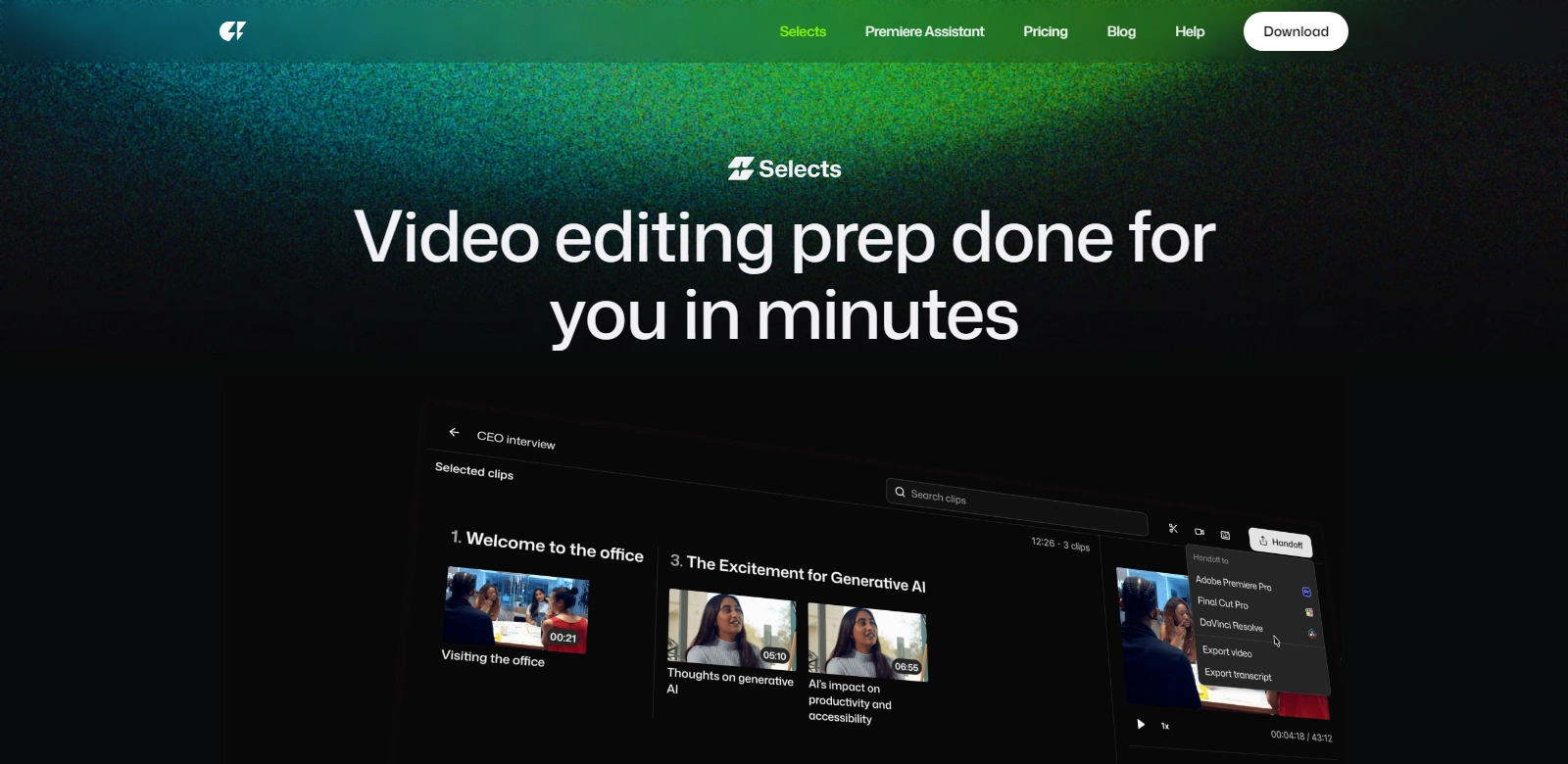
In the fast-paced world of video production, efficiency and creativity must go hand in hand. Enter Selects by Cutback, an innovative AI tool designed specifically for creators and studios who wish to streamline their editing process. This software simplifies the initial 70% of video editing, from sorting and organizing footage to previewing and reviewing content, allowing professionals to focus on the creative aspects sooner than ever. Compatible with major editing platforms like Adobe Premiere Pro, Final Cut Pro, and DaVinci Resolve, Selects is becoming an indispensable part of modern video production.
Customers of Cutback
Understanding the customer base for Selects is crucial in appreciating the tool's utility. Here’s a customer persona analysis that highlights different creators and studios who benefit from using Selects:
-
Independent Filmmakers: Independent filmmakers often operate on tight budgets and time constraints. Selects helps them manage vast amounts of footage efficiently without needing a large editing team. By automating mundane tasks, these filmmakers can shift their focus to storytelling and artistic vision, thus enhancing their final product.
-
Video Production Companies: Professional video production companies handle many projects simultaneously. With Selects, these companies can speed up the review process for clients, ensuring a quicker turn-around time. The ability to quickly pull selects aids in smoother client interactions and better project management, leading to stronger business relationships.
-
Marketing Teams: For in-house marketing teams, content is king. Selects allows marketers to expedite the editing of promotional videos. The tool’s sorting and reviewing capabilities mean that teams can meet marketing deadlines without sacrificing quality, thus maintaining brand integrity.
-
Content Creators on Social Media: With the rise of platforms like YouTube and TikTok, content creators need to produce videos at an unprecedented pace. Selects assists in sifting through large amounts of raw footage, enabling these creators to post high-quality videos more frequently and retain viewer engagement.
-
Educational Institutions: Educational institutions are increasingly utilizing video content for both teaching and promotional purposes. Selects aids educators and administrators in compiling instructional videos and promotional materials efficiently, making video production accessible even to those with limited technical expertise.
Problems and Solution by Cutback
Problems Cutback Found
The video editing process can be cumbersome and time-consuming, leading to several common problems:
-
Footage Overload: Creators often generate far more footage than they need. Manually sorting through hours of video can lead to wasted time and frustration.
-
Time Constraints: In the competitive video production industry, time is a key resource. Editors are frequently under pressure to produce content quickly.
-
Communication Gaps: In team environments, the back-and-forth over content selection can lead to miscommunication, delays, and reduced productivity.
-
Creative Blocks: When overwhelmed by raw footage, creators struggle to maintain focus and creativity, hindering their ability to produce compelling narratives.
-
Skill Gap: Not all creators are adept at video editing, leading to inconsistencies in video quality and storytelling.
Solution by Cutback
Selects effectively solves these issues through its powerful features. By harnessing AI to automate the sorting and organizing of footage, Selects drastically reduces the time spent on mundane tasks. The tool allows for seamless integration with existing video editing software, ensuring that teams can adopt it without a steep learning curve. With the capability to quickly review content and create selects, teams can collaborate better, thus improving communication and project turnaround time.
Use Case
Imagine a mid-sized video production company that handles multiple clients. With Selects, they can easily manage large influxes of footage by sorting clips based on criteria set during pre-production. As a result, editors can focus on refining the story instead of getting bogged down in organization. Similarly, a social media influencer preparing a week’s worth of content can use Selects to quickly curate footage, edit videos, and schedule posts with minimal disruption to their workflow.
Top Features of Cutback
Selects boasts several features designed to enhance the editing experience:
-
Automated Sorting: Selects utilizes AI technology to organize footage based on parameters you set, allowing for quicker access to the best clips.
-
Integration with Editing Software: Whether you use Adobe Premiere Pro, Final Cut, or DaVinci Resolve, Selects works seamlessly with your existing tools, circumventing the need for new software training.
-
Collaborative Features: The tool supports team environments by allowing multiple users to comment and select footage, thereby improving communication and workflow.
-
User-Friendly Interface: The intuitive design of Selects allows users of all skill levels to navigate the software easily, lowering the barrier to efficient editing practices.
-
Feedback Mechanisms: Teams can share selects directly within the platform, allowing for faster feedback loops and client revisions that save time.
Frequently Asked Questions with Cutback
-
How does Selects enhance my editing workflow? By automating the sorting and selecting of footage, Selects saves hours of manual work, allowing editors to concentrate on the creative process instead of logistical tasks.
-
Can I use Selects with my existing editing software? Yes! Selects is designed to integrate smoothly with popular editing platforms like Adobe Premiere Pro, Final Cut Pro, and DaVinci Resolve, making it user-friendly for any setup.
-
Is the tool suitable for beginners? Absolutely. Selects is designed with a user-friendly interface that helps creators at all levels effectively manage their footage without overwhelming complexity.
-
What kind of support is available if I encounter issues? Cutback provides robust customer support, including tutorials and direct assistance from their knowledgeable team, ensuring that users can quickly resolve any issues they may face.
-
Can Selects help with collaborative projects? Yes, Selects is particularly useful for teams, enabling multiple users to comment and manage footage collectively, which streamlines the entire editing process.