Comprehensive Guide to Discord Timestamp Generator
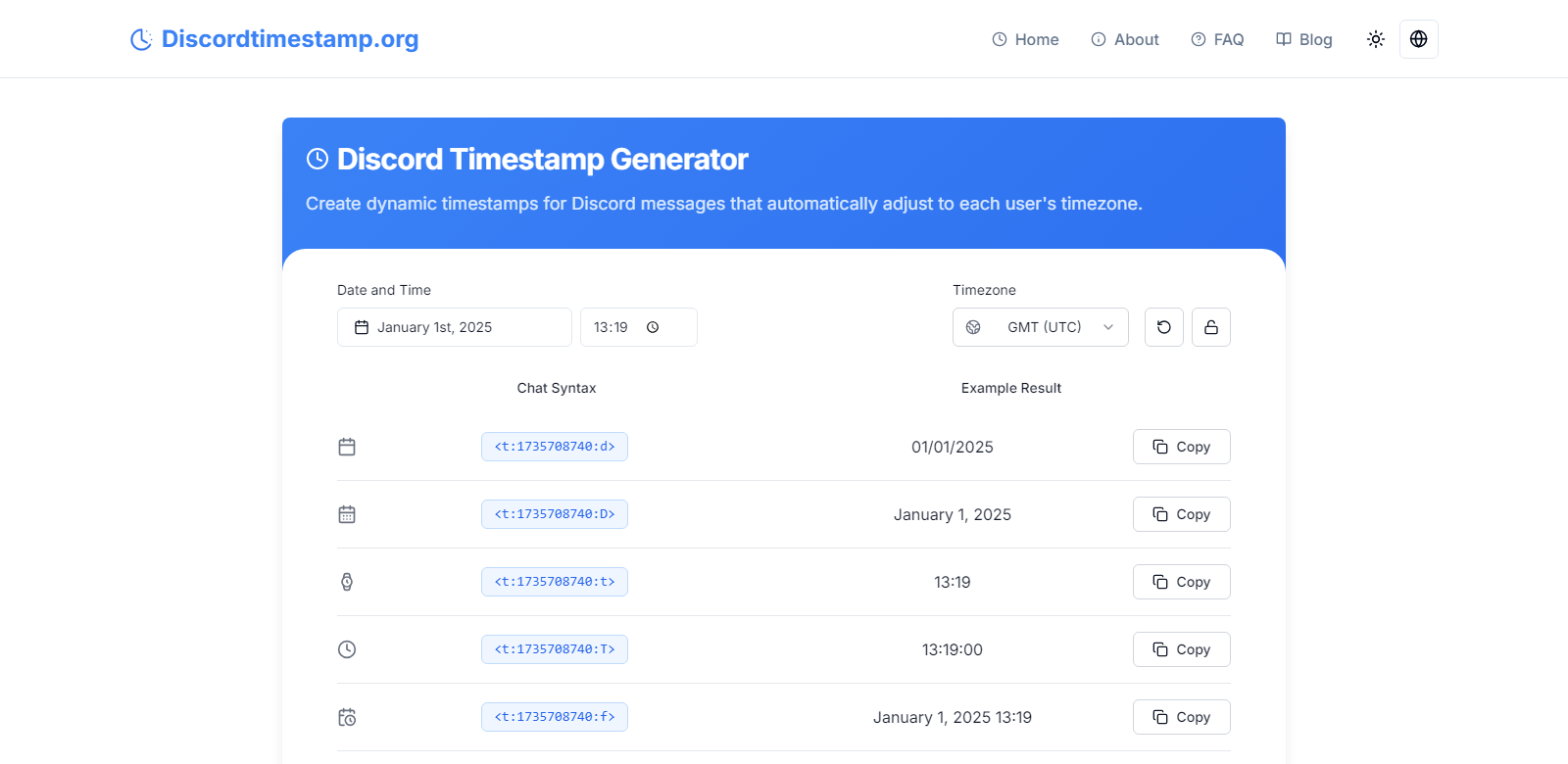
DiscordTimestamp.org is a specialized tool designed for users of the Discord platform, providing an efficient way to generate and convert timestamps tailored specifically for Discord messages. This tool is particularly valuable for users who need to synchronize events across different time zones or maintain an organized record of messages. The platform is user-friendly, allowing both seasoned Discord users and newcomers to take advantage of its capabilities with ease.
Customers of DiscordTimestamp.org
Understanding the diverse range of users who benefit from DiscordTimestamp.org can help clarify its importance in the digital communication landscape. The platform caters to various customer personas, each with unique needs and preferences:
-
Gamers:
Gamers often use Discord for real-time communication during gameplay. The timestamp generator allows them to schedule game sessions, coordinate strategies, and keep track of when messages were sent, enhancing their gaming experience. By using timestamps, they can refer back to critical moments in discussions or plan future gaming events efficiently. -
Event Organizers:
Individuals or groups organizing online events such as tournaments, webinars, or community meetups find this tool invaluable. The ability to generate precise timestamps ensures that all participants are aware of event timings, regardless of their geographical locations. This feature minimizes confusion and enhances participation rates. -
Content Creators:
Streamers and content creators rely heavily on Discord for community engagement. By utilizing timestamps, they can effectively track their interactions with followers and schedule content releases. This organized approach allows them to maintain a consistent online presence, which is crucial for audience retention and growth. -
Community Managers:
Managers of Discord communities benefit from the timestamp generator when moderating discussions or planning community activities. The ability to insert timestamps in messages helps them document important conversations and ensures that all community members are on the same page regarding event timings. -
Developers and Tech Enthusiasts:
Developers who use Discord for collaboration can leverage timestamps to coordinate project timelines and deadlines. By embedding timestamps in their communications, they can keep track of progress and ensure accountability among team members, which is essential in fast-paced development environments.
Problems and Solution by DiscordTimestamp.org
DiscordTimestamp.org addresses several common challenges that users face when communicating on Discord.
Problems DiscordTimestamp.org Found
-
Time Zone Confusion:
One of the major issues in global communication is the confusion arising from different time zones. Users often struggle to coordinate events or discussions when members are spread across various regions. -
Message Clarity:
Without timestamps, messages can lose context over time. Important discussions can become muddled, making it hard to track decisions or event schedules. -
Event Scheduling Difficulties:
Organizing events can be a logistical nightmare without a clear timeline. Users often miss out on events or misunderstand when they are supposed to participate. -
Lack of Standardization:
Different users may have varying methods of indicating time, leading to inconsistencies in communication. This lack of standardization can create confusion and misinterpretations. -
Inability to Reference Past Messages:
Users frequently need to refer back to previous messages for context. Without timestamps, it is challenging to pinpoint when specific discussions took place.
Solution by DiscordTimestamp.org
DiscordTimestamp.org provides a straightforward solution to these problems through its timestamp generator. By allowing users to create timestamps that automatically adjust for each individual's time zone, the platform eliminates confusion and ensures clarity in communication. Users can generate various timestamp formats, including short and long date formats, as well as relative time indicators, making it easy to convey information accurately. This tool not only enhances message clarity but also streamlines event scheduling, allowing users to focus on their discussions rather than logistical challenges.
Use Case
The use cases for DiscordTimestamp.org are diverse and impactful. For instance, a gaming community might use the timestamp generator to schedule a tournament, ensuring all players know when to log in. Similarly, a content creator might utilize timestamps to announce the release of a new video, allowing fans to mark their calendars. Community managers can use the tool to document important announcements, while developers can track project timelines. Each use case highlights the tool's versatility in enhancing communication and organization within Discord.
Top Features of DiscordTimestamp.org
DiscordTimestamp.org boasts several key features that set it apart as a valuable tool for Discord users:
-
Dynamic Timezone Adjustments:
The generator automatically adjusts timestamps based on the user's local time, ensuring everyone is on the same page regardless of their location. -
Multiple Timestamp Formats:
Users can choose from various formats, including short date, long date, short time, long time, and relative time, catering to different communication needs. -
User-Friendly Interface:
The straightforward design of the platform makes it accessible for all users, regardless of their technical expertise. -
Copy and Paste Functionality:
Generated timestamps can be easily copied and pasted into Discord messages, streamlining the communication process. -
Comprehensive Support Resources:
The website offers FAQs and guides, helping users maximize the tool's potential and resolve any issues they may encounter.
Frequently Asked Questions with DiscordTimestamp.org
-
What are Discord timestamps?
Discord timestamps are formatted codes that represent specific dates and times, allowing users to communicate time-sensitive information clearly. They adjust automatically to the local time of each user, making them an essential tool for global communication. -
Why should I use Discord timestamps?
Utilizing Discord timestamps enhances clarity in conversations, ensures everyone is aware of event timings, and helps maintain an organized record of discussions. This is particularly useful for users participating in global communities. -
How do I insert a timestamp into my Discord message?
Simply generate a timestamp using DiscordTimestamp.org, copy the provided code, and paste it directly into your Discord message. The timestamp will be displayed in the appropriate format, making it easy for your audience to understand. -
Can I use Discord timestamps for past dates?
Yes, Discord timestamps can be generated for any date and time, including past dates. This feature is beneficial for referencing historical discussions or events within a community. -
Is there a cost to use DiscordTimestamp.org?
No, DiscordTimestamp.org is a free tool, making it accessible for all users who wish to enhance their communication on the Discord platform.