Shrinkpad: Your Go-To Solution for Batch Image and Video Compression on Mac
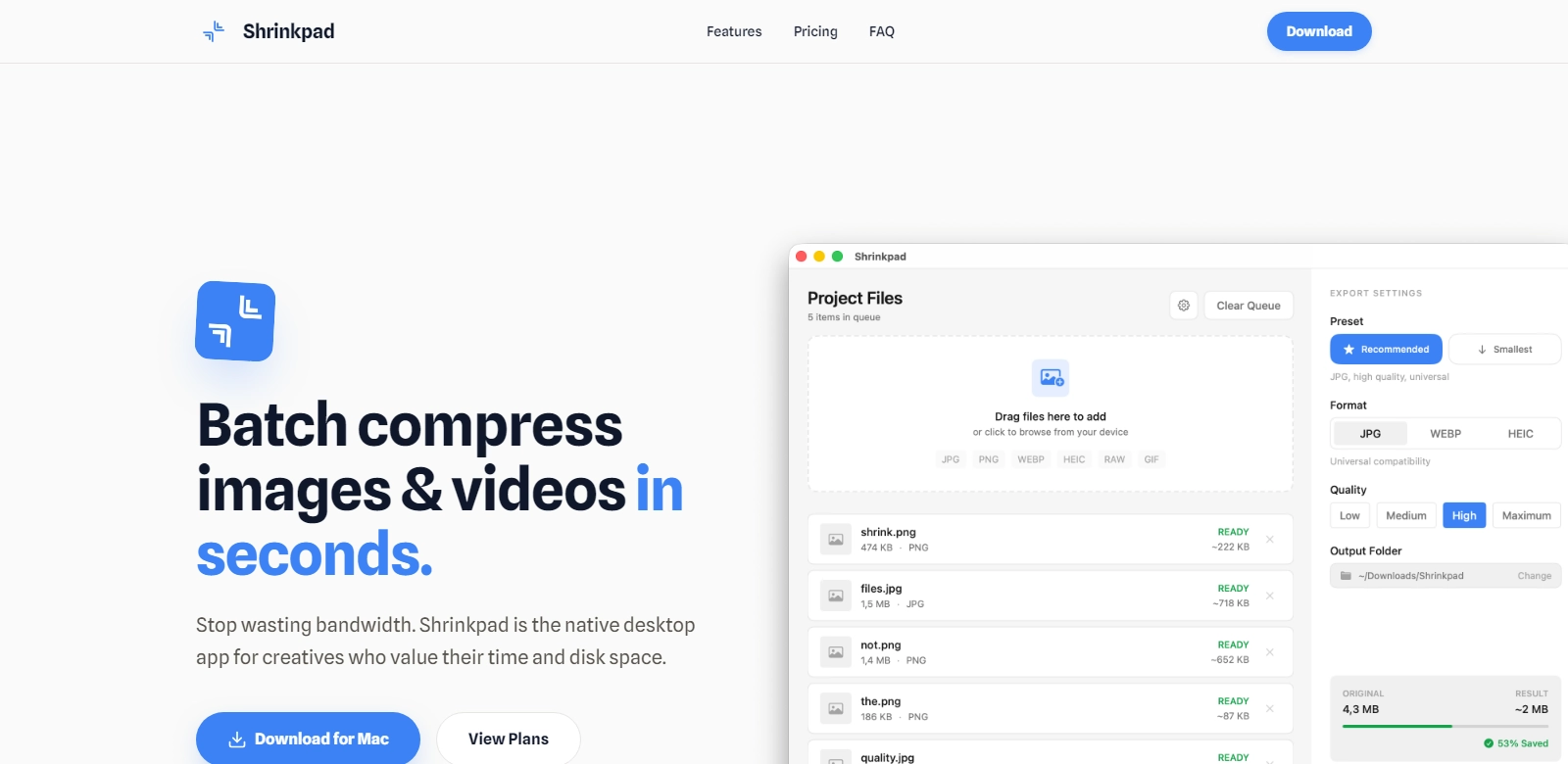
In today’s digital landscape, managing media files efficiently is crucial. This is where Shrinkpad comes in, offering a powerful native macOS application designed to simplify batch compression of images and videos. The app boasts a swift processing capability that allows users to handle thousands of files locally without compromising privacy. Supporting a variety of formats including RAW, HEIC, MP4, and over 30 additional file types, Shrinkpad stands out as a reliable tool for media management.
Customers of Shrinkpad
Shrinkpad serves a diverse clientele, each with unique needs and challenges in media handling. Understanding their requirements is crucial for maximizing the benefits of the application. Here are some key customer personas:
-
Photographers: Professional photographers constantly grapple with large file sizes from high-resolution images. Shrinkpad allows them to batch-process these files, maintaining quality while significantly reducing storage space and improving upload speeds for portfolios or client deliveries.
-
Video Producers: In the fast-paced world of video production, efficiency is paramount. Video producers can utilize Shrinkpad to compress videos for easier sharing and faster edits, providing a smoother workflow without sacrificing the quality of their content.
-
Graphic Designers: Graphic designers often need to share large design files with clients and collaborators. By compressing images while keeping essential details intact, Shrinkpad facilitates quick job deliveries and optimizes online sharing.
-
Marketing Teams: For marketing teams that rely heavily on visual content, Shrinkpad offers a solution to compress imagery for web usage, ensuring faster loading times on websites and social platforms. This enhancement leads to better engagement with their audience.
-
Everyday Users: Regular users looking to store or share photos and videos can take advantage of Shrinkpad’s straightforward interface. The app allows them to compress files, freeing up device storage while ensuring memories are preserved without excessive file sizes.
Problems and Solutions by Shrinkpad
In a world increasingly dominated by digital media, file size and management can pose significant challenges. Shrinkpad addresses these issues promptly and effectively.
Problems Shrinkpad Found
-
Inefficient File Management: Users often face difficulties managing large files, leading to slower devices and cumbersome workflows. Shrinkpad streamlines this process by empowering users to batch compress multiple files simultaneously.
-
Privacy Concerns: With many online tools requiring file uploads, privacy becomes a concern. Shrinkpad processes files locally on macOS, ensuring that sensitive images and videos remain private and secure.
-
Limited Format Support: Many compression tools support only a few file types, restricting user options. Shrinkpad supports over 30 formats, catering to diverse user needs.
Solution by Shrinkpad
Shrinkpad stands out by providing an all-in-one solution for batch compression, ensuring efficiency without compromising on the quality of images or videos. It allows users to fully customize their compression settings – whether aiming for minimal loss in quality or maximum reduction in file size. Furthermore, the application operates entirely on the user's device, eliminating security risks associated with third-party servers.
Use Case
Consider a photographer preparing for a gallery show. With hundreds of images to prepare and deadlines looming, they can use Shrinkpad for bulk compression to optimize the file sizes for both digital and print formats. This ensures the photographer saves time while efficiently managing their media files. Similarly, a small marketing team producing a video campaign can use Shrinkpad to compress their promotional videos, ensuring they meet social media guidelines for file sizes without sacrificing visual quality.
Top Features of Shrinkpad
The features of Shrinkpad enhance its utility and user experience:
-
Batch Processing: Fast and effortless compression of multiple files at once, saving time for users.
-
Wide Format Compatibility: Supports a variety of formats, providing flexibility for all types of media needs.
-
Local Processing: Keeps our files private and secure, as everything is processed directly on users’ devices.
-
Custom Compression Settings: Users can tailor compression levels to suit their specific quality and size requirements.
-
User-Friendly Interface: Easily navigable UI, ensuring quick and seamless usability even for those new to compression tools.
Frequently Asked Questions with Shrinkpad
Here are some common inquiries regarding Shrinkpad, highlighting its usability and advantages:
-
How does Shrinkpad maintain file quality during compression? Shrinkpad employs advanced algorithms that intelligently reduce file size while retaining image clarity and detail. Users can adjust these settings to achieve their desired balance between file size and quality.
-
Can I compress videos for different platforms? Yes, Shrinkpad is designed to optimize videos for various platforms. Users can select compression settings tailored for social media, making the process straightforward and efficient.
-
Is Shrinkpad suitable for large-scale projects? Absolutely, Shrinkpad's batch processing capabilities make it ideal for large projects, allowing users to handle multiple files efficiently without sacrificing speed or quality.
-
Will using Shrinkpad affect my computer's performance? No, Shrinkpad is optimized to run smoothly on macOS, ensuring high performance without hindering the overall system speed. Users can compress files without any noticeable impact on their device’s functionality.
-
Can I restore my files after compression? Compression is a reversible process, as long as the original files are maintained. Shrinkpad allows users to save copies of compressed files while preserving the originals, offering peace of mind.