
MailSweeper: Tame Your Gmail Inbox
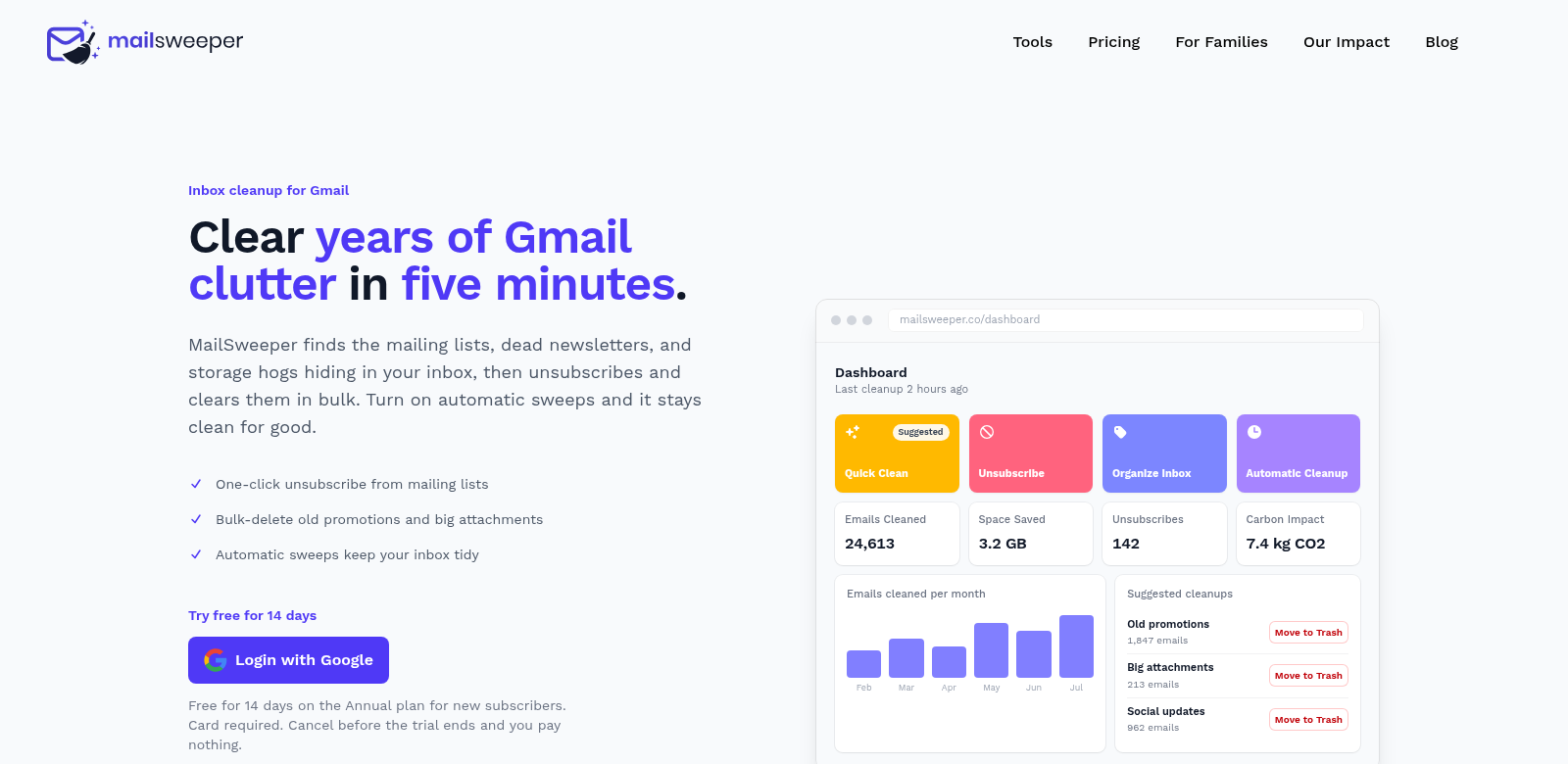
Gmail can get messy, fast. MailSweeper is here to help you clean it up. It handles the annoying stuff—unsubscribing from junk, deleting old promotions, and sorting out huge attachments—so you don't have to. We built MailSweeper to bring some calm and order to your digital life, making your email experience genuinely better. If you're tired of a cluttered inbox, MailSweeper is the simple, effective tool you need.
Who Uses MailSweeper?
MailSweeper helps all sorts of people keep their inboxes under control. Here are a few examples:
-
Busy Professionals: If your job means you're drowning in promotional emails and newsletters, MailSweeper is a lifesaver. It keeps things tidy so you can focus on what actually matters, without all the noise.
-
Students: Students often get swamped with school newsletters and group emails. MailSweeper helps them manage all that academic chatter, keeping their inbox organized so they can quickly find important documents and announcements.
-
Online Shoppers: Love to shop online? Then you know the flood of promotions and order confirmations. MailSweeper can batch unsubscribe and clear out old deals, keeping your inbox focused on what's current and useful.
-
Small Business Owners: Staying on top of communication is key for small businesses. MailSweeper helps owners clear out irrelevant emails and keep essential client messages front and center, making client interactions smoother.
-
Tech-Savvy Users: For those who love smart tools, MailSweeper's automated features are a real win. It's designed for anyone looking for an efficient way to simplify their digital life.
The Problem: Email Overload. The Solution: MailSweeper.
Email isn't getting any simpler. We all face common frustrations that can kill productivity and make staying organized a nightmare.
The Problems We All Face
-
Email Overload: Too many emails mean you miss important stuff. It's easy for your personal and work life to get derailed.
-
Unsubscribing is a Pain: Trying to stop those endless promotional emails feels like a never-ending battle. It's so frustrating, most of us just give up.
-
Attachment Chaos: Big attachments eat up storage and make it impossible to find the messages you actually need.
-
Lost Opportunities: Promotions can be useful, but they also bury your inbox. That means you might miss out on a good deal because the email got lost in the clutter.
How MailSweeper Fixes It
MailSweeper tackles these modern email headaches with a suite of automated features:
-
Automatic Unsubscribing: Tell MailSweeper to automatically unsubscribe you from newsletters and promotions. It takes the chore out of managing unwanted messages.
-
Scheduled Clean-Ups: Set MailSweeper to tidy your inbox on a schedule. It keeps things organized for you, day after day.
-
Attachment Management: MailSweeper finds and manages large attachments. This frees up precious storage space and makes it easier to access important files.
-
Smart Categorization: The tool intelligently sorts your emails, helping you prioritize what's important based on your preferences.
A Real-World Example
Imagine a busy professional, constantly bombarded with newsletters and promotional emails. They install MailSweeper, set up their automatic cleaning and scheduling, and then forget about it. A few weeks later, their inbox is transformed: important messages are easy to find, and all that irrelevant junk is automatically sorted or deleted. A student could do the same, setting MailSweeper to prioritize departmental communications, making it easier to focus on their studies.
MailSweeper's Best Features
We designed MailSweeper's features to make your life easier:
-
Bulk Unsubscribing: Stop getting multiple newsletters at once. It's a huge time-saver.
-
Scheduled Cleans: Set it and forget it. Your inbox stays organized automatically.
-
Attachment Management: Find and categorize big files, freeing up storage space.
-
Smart Categorization: Our system sorts emails based on what you care about, helping you manage your inbox better.
-
User-Friendly Interface: Whether you're a tech wizard or just getting started, MailSweeper is simple to use and easy to navigate.
MailSweeper: Your Questions Answered
-
How does MailSweeper clean my inbox automatically? MailSweeper uses smart systems to spot and handle irrelevant emails based on your settings. It can automatically unsubscribe you and delete old promotions. You can also schedule regular clean-ups to keep things tidy.
-
What happens to emails MailSweeper deletes? MailSweeper removes emails based on your preferences. Once deleted, they're gone for good. So, always double-check your deletion settings and make sure you've backed up anything important.
-
Is my data safe with MailSweeper? Yes, absolutely. We take security seriously. MailSweeper handles all your email data and changes according to strict privacy standards, so you can relax.
-
Can I customize MailSweeper to my liking? You bet! MailSweeper offers plenty of ways to customize. You can set specific rules for unsubscribing, schedule clean-ups, and categorize emails exactly how you need them.
-
Does MailSweeper work with other email providers? Right now, MailSweeper is built specifically for Gmail users, giving you the best performance for managing your Gmail inbox. We are thinking about expanding to other email platforms in the future.